

PostgreSQL 数据库内核分析-c2
-
date_range 01/01/2021 00:00
点击量:次infosortPostgreSQLlabelPostgreSQL架构
2. 第2章 PostgreSQL的体系结构
图2-1 PostgreSQL的构
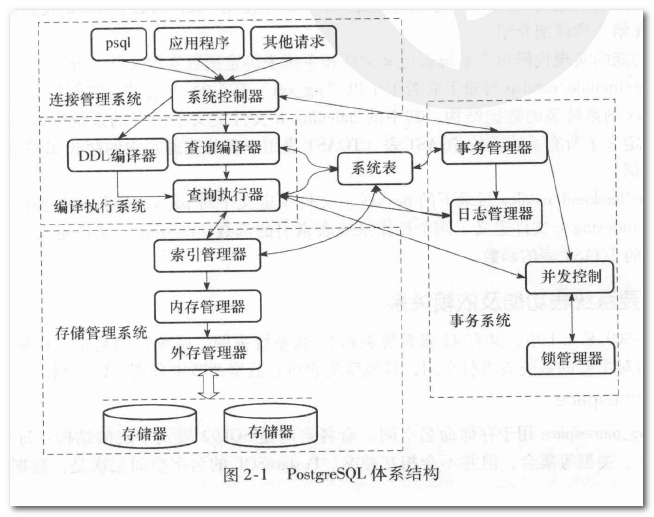
- 连接管理系统: 接收外部操作对系统的请求,对操作请求进行预处理和分发,起系统逻辑控制作用
- 编译执行系统: 由查询编译器、查询执行器完成,完成操作请求在数据库中的分析处理和转化工作, 最终时间物理存储介质中数据的操作;
- 存储管理系统由索引管理器、内存管理器、外存管理器组成,负责存储和管理物理数据,提供对编译查询系统的支持;
- 事务系统由事务管理器、日志管理器、并发控制、锁管理器组成,日志管理器和事务管理器完成对操作请求处理的事务一致性支持,锁管理器和并发控制提供对并发访问数据的一致性支持;
- 系统表是PostgreSQL数据库的元信息管理中心, 包括数据库对象信息和数据库管理控制信息。系统表管理元数据信息,将PostgreSQL数据库的各个模块连接在一起,形成一个高效的数据管理系统。
2.1. 系统表
由SQL命令关联的系统表操作自动维护系统表信息。 为提高系统性能,在内存中建立了共享的系统表CACHE,使用Hash函数和Hash表提高查询效率。
2.1.1. 主要系统表功能及依赖关系
图2-2 关键系统表之间的相互依赖关系

2.1.2. 系统视图
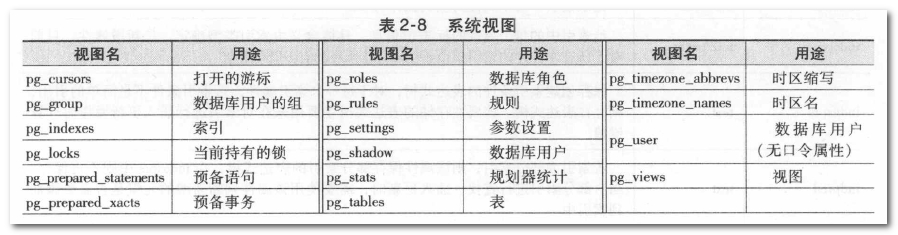
initdb过程中生成了系统表。
2.2. 数据集簇
由PostgreSQL管理的用户数据库以及系统数据库总称。
OID: 对象标识符,对于数据库中的对象如表、索引、视图、类型等,也对应于系统表pg_class中的一个元组。
初始化数据集簇包括创建包含数据库系统所有数据的数据目录、创建共享的系统表、创建其他的配置文件和控制文件,并创建三个数据库:模板数据库template1和template0、默认的用户数据库postgres。
以后用户创建一个新数据库时,template1数据库里的所有内容(包括系统表文件)都会拷贝过来。
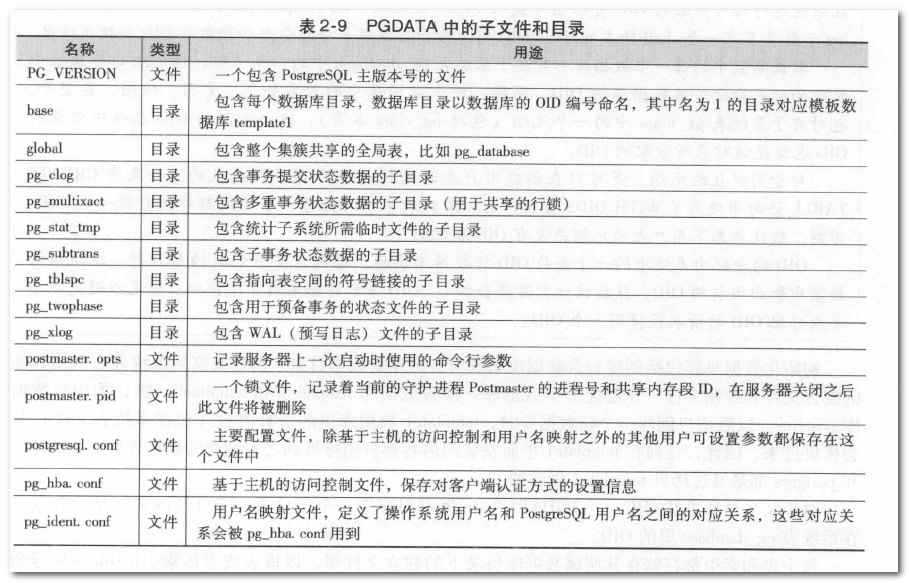 表2-9
表2-9 PGDATA中的子文件和目录
2.2.1. initdb的使用
[postgres@pghost1 ~]$ /opt/pgsql/bin/initdb -D /pgdata/10/data -W
The files belonging to this database system will be owned by user "postgres".
This user must also own the server process.
The database cluster will be initialized with locale "en_US.UTF-8".
The default database encoding has accordingly been set to "UTF8".
The default text search configuration will be set to "english".
Data page checksums are disabled.
Enter new superuser password:
Enter it again:
fixing permissions on existing directory /export/pg10_data …… ok
creating subdirectories …… ok
selecting default max_connections …… 100
selecting default shared_buffers …… 128MB
selecting dynamic shared memory implementation …… posix
creating configuration files …… ok
running bootstrap script …… ok
performing post-bootstrap initialization …… ok
syncing data to disk …… ok
WARNING:enabling "trust" authentication for local connections
You can change this by editing pg_hba.conf or using the option -A, or
——auth-local and ——auth-host, the next time you run initdb.
Success.You can now start the database server using:
/opt/pgsql/bin/pg_ctl -D /pgdata/10/data -l logfile start
[postgres@pghost1 ~]$
2.2.2. postgres.bki
postgres.bki仅用于初始化数据集
模板数据库template1是通过运行在bootstrap模式的Postgres程序读取postgres.bki文件创建的。
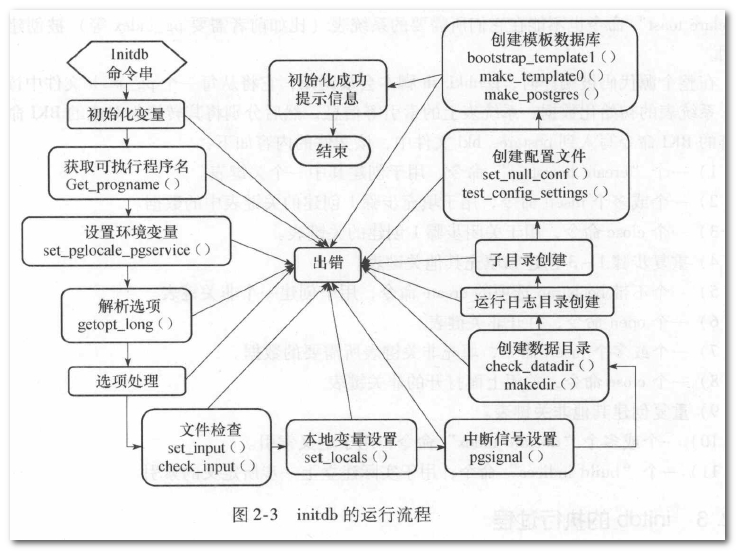
2.2.3. initdb的执行过程
从initdb.c中的main函数开始执行。
2.3. PostgreSQL进程结构
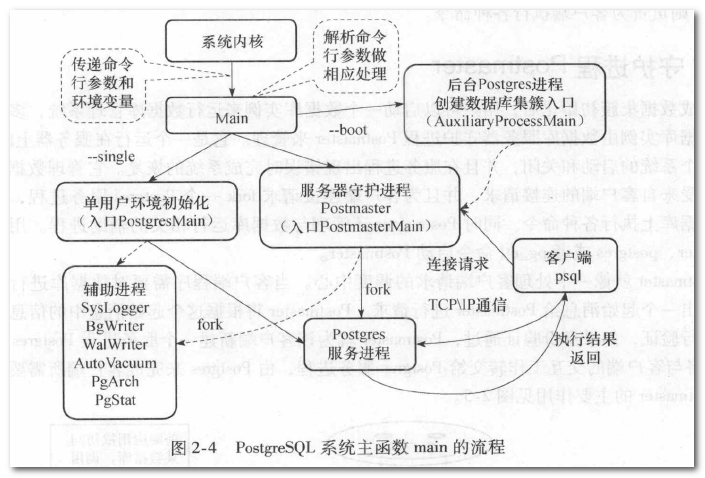
入口是Main模块中的main函数,在初始化数据集、启动数据库服务器时,都从这里开始执行。
最主要的两个进程: 守护进程Postmaster和服务进程Postgres。
 守护进程
守护进程Postmaster为每一个客户端分配一个服务进程Postgres。

2.4. 守护进程Postmaster
守护进程Postmaster的请求响应模型。
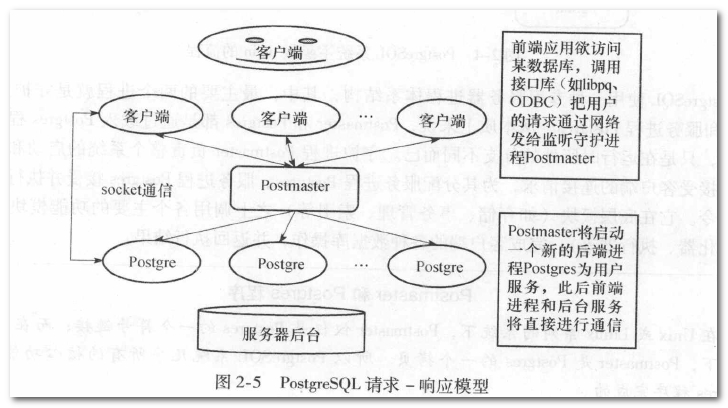 守护进程
守护进程Postmaster及其子进程的通信就通过共享内存和信号来实现,其代码位于src/backend/postmaster
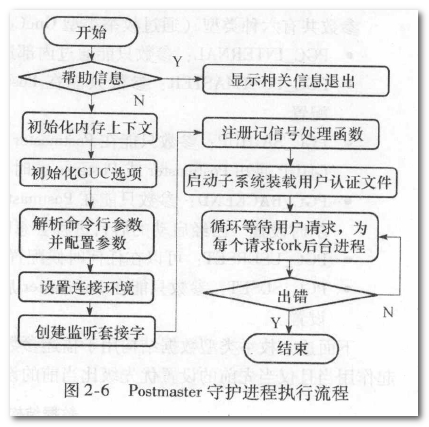
2.4.1. 初始化内存上下文
内存上下文机制用于避免内存泄露。

// gtm.h
#define TopMemoryContext (GetMyThreadInfo->thr_thread_context)
#define ThreadTopContext (GetMyThreadInfo->thr_thread_context)
#define MessageContext (GetMyThreadInfo->thr_message_context)
#define CurrentMemoryContext (GetMyThreadInfo->thr_current_context)
#define ErrorContext (GetMyThreadInfo->thr_error_context)
2.4.2. 配置参数
配置参数的数据结构:
struct config_generic {
    /* constant fields, must be set correctly in initial value: */
    const char* name;       /* name of variable - MUST BE FIRST */
    GtmOptContext context;  /* context required to set the variable */
    const char* short_desc; /* short desc. of this variable's purpose */
    const char* long_desc;  /* long desc. of this variable's purpose */
    int flags;              /* flag bits, see below */
    /* variable fields, initialized at runtime: */
    enum config_type vartype;  /* type of variable (set only at startup) */
    int status;                /* status bits, see below */
    GtmOptSource reset_source; /* source of the reset_value */
    GtmOptSource source;       /* source of the current actual value */
    GtmOptStack* stack;        /* stacked prior values */
    void* extra;               /* "extra" pointer for current actual value */
    char* sourcefile;          /* file current setting is from (NULL if not
                                * file) */
    int sourceline;            /* line in source file */
};

struct config_int {
    struct config_generic gen;
    /* constant fields, must be set correctly in initial value: */
    int* variable;
    int boot_val;
    int min;
    int max;
    GtmOptIntCheckHook check_hook;
    GtmOptIntAssignHook assign_hook;
    /* variable fields, initialized at runtime: */
    int reset_val;
    void* reset_extra;
};
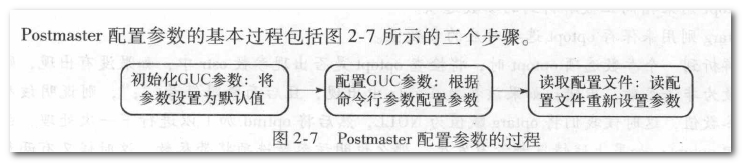
配置参数的步骤:
2.4.3. 创建监听套接字
相关数据结构:
// 服务器IP地址
extern char* ListenAddresses;
// 与服务器某个IP地址绑定的监听套接字描述符
extern int ServerListenSocket[MAXLISTEN];
// 使用`getaddrinfo`系统函数返回与协议无关的套接字时需要关心的信息
struct addrinfo {
    int ai_flags;
    int ai_family;
    int ai_socktype;
    int ai_protocol;
    size_t ai_addrlen; // 地址结构长度
    char* ai_canonname;
    struct sockaddr* ai_addr; // 地址指针
    struct addrinfo* ai_next;
};
PostgreSQL中的List数据结构:
typedef struct List {
    NodeTag type; /* T_List, T_IntList, or T_OidList */
    int length;
    ListCell* head;
    ListCell* tail;
} List;

struct ListCell {
    union {
        void* ptr_value;
        int int_value;
        Oid oid_value;
    } data;
    ListCell* next;
};
2.4.4. 注册信号处理函数
三个信号集:
// 不希望屏蔽的信号集、要屏蔽的信号集、进行用户连接认证时需要屏蔽的信号集
extern THR_LOCAL sigset_t UnBlockSig, BlockSig, AuthBlockSig;
几个主要的信号处理函数的功能:
// 配置文件改变产生`SIGHUP`信号
static void SIGHUP_handler(SIGNAL_ARGS);
    (void)gspqsignal(SIGHUP, SIGHUP_handler); /* reread config file and have

// 处理`SIGINT`/`SIGQUIT`/`SIGTERM`
static void pmdie(SIGNAL_ARGS);
    (void)gspqsignal(SIGINT, pmdie);          /* send SIGTERM and shut down */
    (void)gspqsignal(SIGQUIT, pmdie);         /* send SIGQUIT and die */
    (void)gspqsignal(SIGTERM, pmdie);         /* wait for children and shut down */

// 用于清除退出子进程的资源
    (void)gspqsignal(SIGCHLD, reaper);          /* handle child termination */
2.4.5. 辅助进程启动
- SysLogger
- pgstat
- autovacuum
/*
 * Postmaster subroutine to start a syslogger subprocess.
 * 收集所有的stderr输出,并写入到日志文件
 */
ThreadId SysLogger_Start(void)

/* ----------
 * pgstat_init() -
 *
 *	Called from postmaster at startup. Create the resources required
 *	by the statistics collector process.  If unable to do so, do not
 *	fail --- better to let the postmaster start with stats collection
 *	disabled.
 * ----------
 */
void pgstat_init(void)

/*
 * Main loop for the autovacuum launcher process.
 */
NON_EXEC_STATIC void AutoVacLauncherMain()
2.4.6. 装载客户端认证文件
pg_hba.conf文件则负责客户端的连接和认证。这两个文件都位于初始化数据目录中。
# TYPE DATABASE USER ADDRESS METHOD
pg_ident.conf文件是基于身份认证的配置文件。
# MAPNAME SYSTEM-USERNAME PG-USERNAME
2.4.7. 循环等待客户连接请求
typedef struct Port {
    int sock;                  /* File descriptor */
    CMSockAddr laddr;          /* local addr (postmaster) */
    CMSockAddr raddr;          /* remote addr (client) */
    char* remote_host;         /* name (or ip addr) of remote host */
    char* remote_port;         /* text rep of remote port */
    CM_PortLastCall last_call; /* Last syscall to this port */
    int last_errno;            /* Last errno. zero if the last call succeeds */

    char* user_name;
    …………
} Port;

/*
 * Main idle loop of postmaster
 */
static int ServerLoop(void) {
    // 初始化读文件描述符集
    nSockets = initMasks(&readmask);
    // 等待客户端提出连接请求
    selres = select(nSockets, &rmask, NULL, NULL, &timeout);
    // 如果发现该套接字上有用户提出连接请求,调用`ConnCreate`创建一个`Port`结构体
    if (FD_ISSET(t_thrd.postmaster_cxt.ListenSocket[i], &rmask)) {
        Port* port = NULL;
        ufds[i].revents = 0;
        if (IS_FD_TO_RECV_GSSOCK(ufds[i].fd)) {
            port = ConnCreateToRecvGssock(ufds, i, &nSockets);
        } else {
            port = ConnCreate(ufds[i].fd);
        }

        if (port != NULL) {
            /*
             * Since at present, HA only uses TCP sockets, we can directly compare
             * the corresponding enty in t_thrd.postmaster_cxt.listen_sock_type, even
             * though ufds are not one-to-one mapped to tcp and sctp socket array.
             * If HA adopts STCP sockets later, we will need to maintain socket type
             * array for ufds in initPollfd.
             */
            if (threadPoolActivated && !isConnectHaPort) {
                result = g_threadPoolControler->DispatchSession(port);
            } else {
                // 启动后台进程接替`Postmaster`与客户进行连接
                result = BackendStartup(port, isConnectHaPort);
                    // 根据Port结构体来启动一个`Postgres`服务进程
                    static int BackendStartup(Port* port, bool isConnectHaPort)
                    {
                        Backend* bn = NULL; /* for backend cleanup */
                        ThreadId pid;
                        pid = initialize_worker_thread(WORKER, port);
                            ThreadId initialize_thread(ThreadArg* thr_argv)
                                int error_code = gs_thread_create(&thread, InternalThreadFunc, 1, (void*)thr_argv);
                                    static void* InternalThreadFunc(void* args)
                                    {
                                        gs_thread_exit((GetThreadEntry(thr_argv->role))(thr_argv));
                                            static int BackendRun(Port* port) {
                                                // 进入`PostgresMain`的执行入口
                                                return PostgresMain(ac, av, port->database_name, port->user_name);
                                            }
                                        return (void*)NULL;
                                    }

                        /*
                         * Everything's been successful, it's safe to add this backend to our list
                         * of backends.
                         */
                        bn->pid = pid;
                        bn->is_autovacuum = false;
                        bn->cancel_key = t_thrd.proc_cxt.MyCancelKey;
                        DLInitElem(&bn->elem, bn);
                        // 将该`bn`结构体加入到`backend_list`链表中。
                        DLAddHead(g_instance.backend_list, &bn->elem);
                    }
        }
    }
}
2.5. 辅助进程
typedef struct knl_g_pid_context {
    ThreadId StartupPID;
    ThreadId TwoPhaseCleanerPID;
    ThreadId FaultMonitorPID;
    ThreadId BgWriterPID;
    ThreadId* CkptBgWriterPID;
    ThreadId* PageWriterPID;
    ThreadId CheckpointerPID;
    ThreadId WalWriterPID;
    ThreadId WalReceiverPID;
    ThreadId WalRcvWriterPID;
    ThreadId DataReceiverPID;
    ThreadId DataRcvWriterPID;
    ThreadId AutoVacPID;
    ThreadId PgJobSchdPID;
    ThreadId PgArchPID;
    ThreadId PgStatPID;
    ThreadId PercentilePID;
    ThreadId PgAuditPID;
    ThreadId SysLoggerPID;
    ThreadId CatchupPID;
    ThreadId WLMCollectPID;
    ThreadId WLMCalSpaceInfoPID;
    ThreadId WLMMonitorPID;
    ThreadId WLMArbiterPID;
    ThreadId CPMonitorPID;
    ThreadId AlarmCheckerPID;
    ThreadId CBMWriterPID;
    ThreadId RemoteServicePID;
    ThreadId AioCompleterStarted;
    ThreadId HeartbeatPID;
    ThreadId CsnminSyncPID;
    ThreadId BarrierCreatorPID;
    volatile ThreadId ReaperBackendPID;
    volatile ThreadId SnapshotPID;
    ThreadId AshPID;
    ThreadId StatementPID;
    ThreadId CommSenderFlowPID;
    ThreadId CommReceiverFlowPID;
    ThreadId CommAuxiliaryPID;
    ThreadId CommPoolerCleanPID;
    ThreadId* CommReceiverPIDS;
    ThreadId TsCompactionPID;
    ThreadId TsCompactionAuxiliaryPID;
} knl_g_pid_context;
为辅助线程分配的PID。
2.5.1. SysLogger系统日志进程
配置文件中相关的配置项:
#log_destination = 'stderr'             # Valid values are combinations of
                                        # stderr, csvlog, syslog, and eventlog,
                                        # depending on platform.  csvlog
                                        # requires logging_collector to be on.

# This is used when logging to stderr:
logging_collector = on                  # Enable capturing of stderr and csvlog
                                        # into log files. Required to be on for
                                        # csvlogs.
                                        # (change requires restart)

# These are only used if logging_collector is on:
#log_directory = 'pg_log'               # directory where log files are written,
                                        # can be absolute or relative to PGDATA
log_filename = 'postgresql-%Y-%m-%d_%H%M%S.log' # log file name pattern,
                                        # can include strftime() escapes
log_file_mode = 0600                    # creation mode for log files,
                                        # begin with 0 to use octal notation
#log_truncate_on_rotation = off         # If on, an existing log file with the
                                        # same name as the new log file will be
                                        # truncated rather than appended to.
                                        # But such truncation only occurs on
                                        # time-driven rotation, not on restarts
                                        # or size-driven rotation.  Default is
                                        # off, meaning append to existing files
                                        # in all cases.
#log_rotation_age = 1d                  # Automatic rotation of logfiles will
                                        # happen after that time.  0 disables.
log_rotation_size = 20MB                # Automatic rotation of logfiles will
                                        # happen after that much log output.
                                        # 0 disables.
入口函数:
/*
 * Postmaster subroutine to start a syslogger subprocess.
 */
ThreadId SysLogger_Start(void) {
    // 创建管道用于接收stderr的输出
    if (!CreatePipe(&t_thrd.postmaster_cxt.syslogPipe[0], &t_thrd.postmaster_cxt.syslogPipe[1], &sa, 32768));

    // 创建线程来运行`SYSLOGGER`
    sysloggerPid = initialize_util_thread(SYSLOGGER);
        /*
         * Main entry point for syslogger process
         * argc/argv parameters are valid only in EXEC_BACKEND case.
         */
        NON_EXEC_STATIC void SysLoggerMain(int fd)


    /* success, in postmaster */
    if (sysloggerPid != 0) {
        // 使用`dump2`系统函数将`stdout`和`stderr`重定向到日志的写入端
        fflush(stdout);
        if (dup2(t_thrd.postmaster_cxt.syslogPipe[1], fileno(stdout)) < 0);
        fflush(stderr);
        if (dup2(t_thrd.postmaster_cxt.syslogPipe[1], fileno(stderr)) < 0);
}
2.5.3 WalWriter进程
中心思想: 对数据文件的修改必须是只能发生在这些修改已经记录到日志之后, 也就是先写日志后写数据。
好处: 显著减少了写磁盘的次数。
物理文件位置:pg_xlog目录下
日志记录格式: xlog.h
日志命名规则: 时间线+ 日志文件标号 + 日志文件段标号
内部结构: WAL的缓冲区和控制结构在共享内存中, 他们是用轻量的锁保护的, 对共享内存的需求由缓冲区数量决定。
WAL相关参数:
- fsync 参数说明 : 设置openGauss服务器是否使用fsync()系统函数(请参见[wal_sync_method]确保数据的更新及时写入物理磁盘中。
- synchronous_commit 参数说明:设置当前事务的同步方式。
- wal_sync_method 参数说明:设置向磁盘强制更新WAL数据的方法。
- wal_buffers
参数说明:设置用于存放WAL数据的共享内存空间的XLOG_BLCKSZ数,XLOG_BLCKSZ的大小默认为8KB。 该参数受
wal_writer_delay/commit_delay的影响。 - wal_writer_delay 参数说明:WalWriter进程的写间隔时间。
- commit_delay 参数说明:表示一个已经提交的数据在WAL缓冲区中存放的时间。
- commit_siblings 参数说明:当一个事务发出提交请求时,如果数据库中正在执行的事务数量大于此参数的值,则该事务将等待一段时间([commit_delay]
相关函数:
- 启动函数:
StartWalWriter - 实际工作函数:
WalWriterMain工作函数流程如下所示: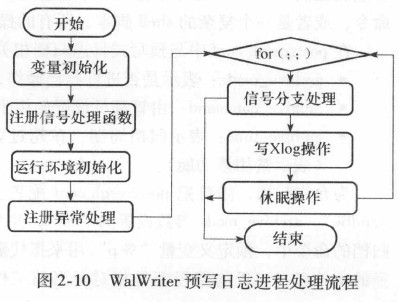
在线备份和恢复:
把数据文件和WAL日志文件保存到另一个存储设备上, 这个动作叫归档, 归档后日志文件可以删除。可以使用pg_dump工具来dump备份数据库文件。
2.6. 服务进程Postgres
服务进程Postgres是实际的接收查询请求并调用相应模块处理查询的PostgreSQL服务进程。
| 文件 | 作用 |
|————–|—————————————|
| postgres.cpp | 管理查询的整体流程 |
| pquery.cpp | 执行一个分析好的查询命令 |
| utility.cpp | 执行各种非查询命令 |
| dest.cpp | 处理Postgres和远端客户的一些消息通信操作,并负责返回命令的执行结果 |
图2-15 PostgresMain函数流程
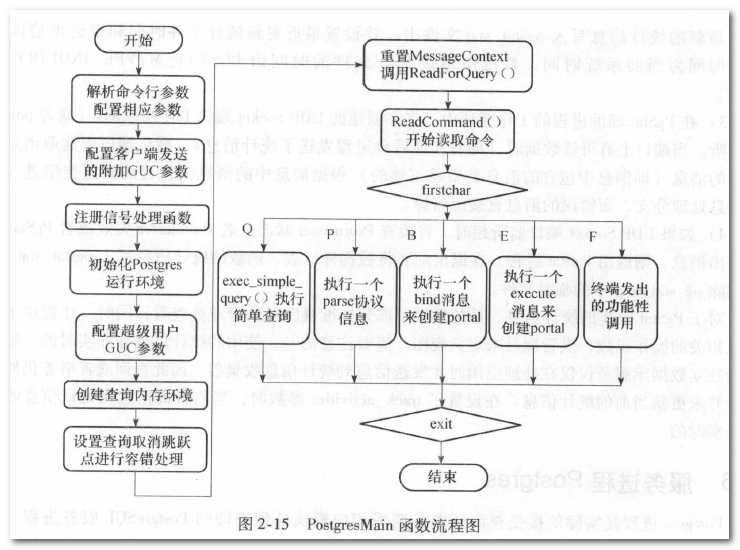
2.6.1. 初始化内存环境
调用MemoryContextInit来完成
2.6.2. 配置运行参数和处理客户端传递的GUC参数
将参数设置成默认值、根据命令行参数配置参数、读配置文件重新设置参数。
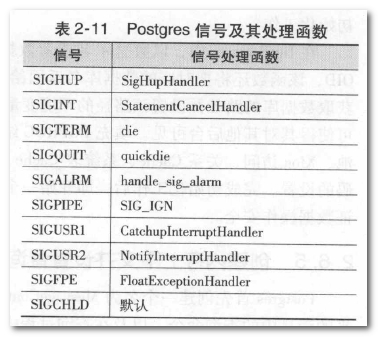
2.6.3. 设置信号处理和信号屏蔽
2.6.4. 初始化Postgres的运行环境
- 设置
DataDir目录 BaseInit完成基本初始化,完成Postgres进程的内存、信号量以及文件句柄的创建和初始化工作- InitCommunication(); Attach to shared memory and semaphores, and initialize our input/output/debugging file descriptors.
- DebugFileOpen();
初始化
input/output/debugging文件描述符 - InitFileAccess(); Do local initialization of file, storage and buffer managers 初始化文件访问
- smgrinit(); 初始化或者关闭存储管理器
- InitBufferPoolAccess(); 初始化共享缓冲区存储区
InitPostgres完成Postgres的初始化
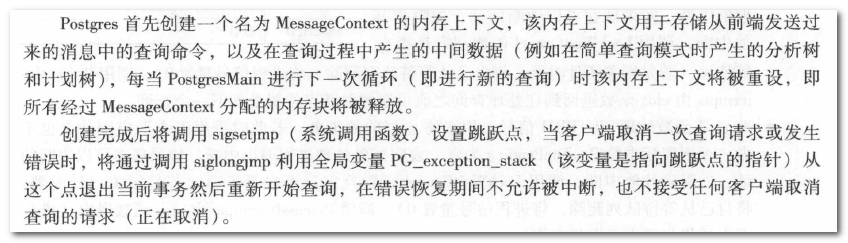
2.6.5. 创建内存上下文并设置查询取消跳跃点
相关数据结构:
#define MessageContext (GetMyThreadInfo->thr_message_context)
2.6.6. 循环等待处理查询
相关数据结构:
    // 用来接收服务器发送给客户端的消息的缓冲区
    char PqSendBuffer[PQ_BUFFER_SIZE];
    int PqSendPointer; /* Next index to store a byte in PqSendBuffer */

    // 用来接收客户端发送给服务器的消息的缓冲区
    char PqRecvBuffer[PQ_BUFFER_SIZE];
    int PqRecvPointer; /* Next index to read a byte from PqRecvBuffer */
    int PqRecvLength;  /* End of data available in PqRecvBuffer */


消息的类型: 对不同类型调用响应的函数来具体处理这些消息
- 启动消息:开始一个会话
- 简单查询:
SQL命令 对应类型为Q的查询会调用exec_simple_query函数来处理,实际上增删改查都是从这里开始执行的。 - 扩展查询
- 函数调用
- 取消正在处理的请求
- 终止
主要流程:
    for (;;) {
        /* 释放上次查询时的内存
         * Release storage left over from prior query cycle, and create a new
         * query input buffer in the cleared t_thrd.mem_cxt.msg_mem_cxt.
         */

        /*
         * (1) If we've reached idle state, tell the frontend we're ready for
         * a new query.
         *
         * Note: this includes fflush()'ing the last of the prior output.
         *
         * This is also a good time to send collected statistics to the
         * collector, and to update the PS stats display.  We avoid doing
         * those every time through the message loop because it'd slow down
         * processing of batched messages, and because we don't want to report
         * uncommitted updates (that confuses autovacuum).	The notification
         * processor wants a call too, if we are not in a transaction block.
         */

        if (send_ready_for_query) {
            if (IS_CLIENT_CONN_VALID(u_sess->proc_cxt.MyProcPort))
                // 告诉客户端它已经准备好接收查询了
                ReadyForQuery((CommandDest)t_thrd.postgres_cxt.whereToSendOutput);
        }

        /*
         * (2) Allow asynchronous signals to be executed immediately if they
         * come in while we are waiting for client input. (This must be
         * conditional since we don't want, say, reads on behalf of COPY FROM
         * STDIN doing the same thing.)
         */
        t_thrd.postgres_cxt.DoingCommandRead = true;

        /*
         * (3) read a command (loop blocks here)
         */
        if (saved_whereToSendOutput != DestNone)
            t_thrd.postgres_cxt.whereToSendOutput = saved_whereToSendOutput;

        firstchar = ReadCommand(&input_message);
            static int ReadCommand(StringInfo inBuf) {
                // 客户端通过网络连接
                if (t_thrd.postgres_cxt.whereToSendOutput == DestRemote)
                    result = SocketBackend(inBuf);
                // 客户端和服务器在同一台服务器上
                else if (t_thrd.postgres_cxt.whereToSendOutput == DestDebug)
                    result = InteractiveBackend(inBuf);
            }
    }
2.6.7. 简单查询的执行流程
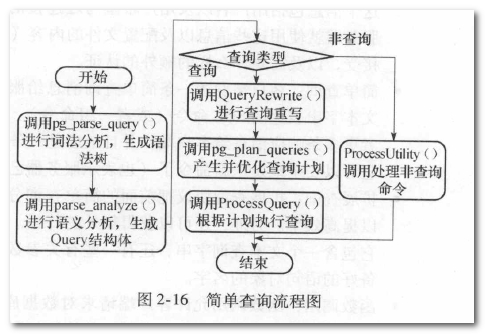
exec_simple_query函数的执行流程:
2.6.7.1. 编译器
扫描用户输入的字符串形式的命令,检查其合法性并将其转换为Postgres定义的内部数据结构。
入口函数为pg_parse_query。
2.6.7.2. 分析器
接收编译其传递过来的各种命令数据结构, 对他们进行相应的处理,最终转换为统一的数据结构Query。
分析器的入口函数是parse_analyze。
如果是查询命令,在生成Query后进行规则重写,重写部分的入口是QueryRewrite函数。
2.6.7.3. 优化器
接收分析器输出的Query结构体,进行优化处理后,输出执行器可以执行的计划(Plan)
入口函数: pg_plan_query
2.6.7.4. 执行器
- 非查询命令的入口函数:
ProcessUtility - 查询命令的入口函数:
ProcessQuery
Postgres后台进程的执行实现了PostgreSQL的多任务并发执行。